
सांचो:Multiple image

 | This template uses Lua: |
This template creates a box with two to ten images arranged vertically or horizontally with captions for the entire box and/or for each images.
Syntax and parameters
[बदल]{{multiple image|caption_align=center|header_align=center
<!-- Essential parameters -->
| align = <!-- right (default), left, center, none -->
| direction = <!-- horizontal (default), vertical -->
| background color = <!-- box background -->
<!-- Header -->
| header_background =
| header_align = <!-- center (default), left, right -->
| header =
<!-- Images -->
| width = <!-- image width in pixels (an integer, omit "px" suffix); overrides "width[n]"s below -->
<!--image 1-->
| image1 = <!-- filename only, i.e. without "File:" or "Image:" prefix -->
| width1 =
| alt1 =
| link1 =
| caption1 =
<!--image 2-->
| image2 = <!-- filename only, i.e. without "File:" or "Image:" prefix -->
| width2 =
| alt2 =
| link2 =
| caption2 =
<!-- and so on, to a maximum of 10 images (image10) -->
<!-- Footer -->
| footer_background =
| footer_align = <!-- left (default), center, right -->
| footer =
}}
| Parameter | Description |
|---|---|
| align | right (default), left, center |
| direction | horizontal (default), vertical |
| background color | To set the background color of the box in which the images appear. |
| header_background | |
| header_align | center (default), left, right |
| header | |
| width | Use to set the same width for each image (i.e. overrides any width[n] below). Do not include if different image widths intended. |
| image[n] | (where [n] = 1 to 10) Filename of [n]th image. |
| width[n] | (as above) Width (in pixels, integer, omit "px") of [n]th image. Overridden by width (if set). |
| alt[n] | (as above) Alt description for [n]th image. |
| link[n] | (as above) To specify the page to which the [n]th image is linked (i.e. the page that is loaded when the image is clicked). If set as empty (e.g. ...|alt1=... |link1= |caption1=...), linking is disabled (even to the standard Wikipedia image description page); consider WP:ALT. Note: This parameter must not be used with images that have been given free licenses (such as the GDFL or a free CC license) as these licenses require images to be linked to a declaration of the license under which they are being used. |
| caption[n] | (as above) Caption for the [n]th image. |
| caption_align | left (default), center, right |
| footer_background | |
| footer_align | left (default), center, right |
Examples
[बदल]

Players are cautioned with a yellow card and sent off with a red card.
{{multiple image|caption_align=center|header_align=center
 | width = 60
 | image1 = Yellow card.svg
 | alt1 = Yellow cartouche
 | image2 = Red card.svg
 | alt2 = Red cartouche
 | footer = Players are cautioned with a yellow card and sent off with a red card.
}}
PNG transparency demonstration

A PNG image with an 8-bit transparency layer...

...here overlaying a checkered background.
{{multiple image|caption_align=center|header_align=center
 | align = left
 | direction = vertical
 | width = 200
 | header = [[PNG]] transparency demonstration
 | image1 = PNG transparency demonstration 1.png
 | alt1 = Colored dice with white background
 | caption1 = A PNG image with an 8-bit transparency layer...
 | image2 = PNG transparency demonstration 2.png
 | alt2 = Colored dice with checkered background
 | caption2  = ...here overlaying a checkered background.
}}
{{multiple image|caption_align=center|header_align=center
 | width = 60
 | image1=Ribbon numeral 2.png | alt1=2
 | image2=Ribbon numeral 3.png | alt2=3
 | image3=Ribbon numeral 4.png | alt3=4
 | footer = When a user has many of one type of [[WP:BARN|barnstar]], they can represent them with [[WP:RIBBON|ribbons]] and these numerals to indicate the count.
}}
with background color
[बदल]


{{multiple image|caption_align=center|header_align=center
 | background color = #BBDD99
 | width = 160
 | image1 = Adoxa_moschatellina_210406.jpg
 | alt1 = Green herb with a few tiny yellow-white flowers
 | image2 = Adoxa_moschatellina_210406a.jpg
 | alt2 = Three small white and yellow flowers before green-leaf background
 | image3 = adoxa_moschatellina_blatt.jpeg
 | alt3 = Leaves of a plant, in groups of three each with three lobes
 | footer_background = #BBDD99
 | footer_align = center
 | footer = [[Adoxa]] (''Adoxa moschatellina'')
}}
with links (link[n])
[बदल]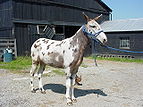
A mule
(骡子 luózi)
(骡子 luózi)
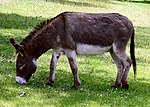
A donkey
(驴子 lǘzi)
(驴子 lǘzi)

A fish
(鱼 yú)
(鱼 yú)
The image of the mule links to Mule; the image of the donkey does not link anywhere; the image of the trout links to a standard image description page.
{{multiple image|caption_align=center|header_align=center
 | align = left

 | image1 = Frecklesmule.jpg
 | width1 = 143
 | alt1 = A mule
 | link1 = Mule
 | caption1 = A mule<br />(骡子 ''luózi'')

 | image2 = Donkey 1 arp 750px.jpg
 | width2 = 150
 | alt2 = A donkey
 | link2 =
 | caption2  = A donkey<br />(驴子 ''lǘzi'')</center>

 | image3 = Rainbow_trout.png
 | width3 = 91
 | alt3 = A trout
 | caption3  = A fish<br />({{lang|zh|2=鱼}} ''yú'')</center>

 | footer = The image of the mule links to [[Mule]]; the image of the donkey does not link anywhere; the image of the trout links to a [[Image description page|standard image description page]].
}}
using direction
[बदल]By default, the images the template presents are displayed horizontally, as a row (see left; equivalent to setting |direction=horizontal). To display them vertically, i.e. as a column, set |direction=vertical (see right).
(horizontal)


(vertical)
to match image heights
[बदल]- Decide on a total width for all the images, say 320px
- Examine the individual image pages to obtain the full resolution. For example:
- File:Donkey 1 arp 750px.jpg shows "Donkey_1_arp_750px.jpg (750 × 536 pixels, file size: 125 KB, MIME type: image/jpeg)"
- File:Rainbow trout.png shows "Rainbow_trout.png (300 × 300 pixels, file size: 158 KB, MIME type: image/png)"
- Specify the full width and height for each image, of the form:
|width1=|height1=|width2=|height2=
- Set the total width using
|total_width=

Rectangular image of a donkey, originally 536 pixels high.
Square image of a trout, originally 300 pixels high.
Both images have been rendered with the same height, and a total width of 320px
{{multiple image|caption_align=center|header_align=center
 | align = right
 | total_width = 320

 | image1 = Donkey 1 arp 750px.jpg
 | width1 = 750 | height1 = 536
 | alt1 = A donkey
 | caption1 = Rectangular image of a donkey, originally 536 pixels high.

 | image2 = Rainbow_trout.png
 | width2 = 300 | height2 = 300
 | alt2 = A trout
 | caption2 = Square image of a trout, originally 300 pixels high.

 | footer = Both images have been rendered with the same height, and a total width of 320px
}}
Multiple rows
[बदल]To create an array of images, with multiple rows, use |perrow=. The value passed to |perrow= may be a single number, or a list of numbers delimited by /. This feature may also be combined with |total_width= for multiple rows of images with the same total width.


Surveying Equipment. Clockwise from upper left: Optical Theodolite, Robotic total station, Optical level, RTK GPS Base station.
{{multiple image|perrow = 2|total_width=300
| image1 = Kern_Theodolit_DKM2-A.jpg  |width1=319|height1=425
| image2 = Total-Robotic-Station.jpg  |width2=1728|height2=3072
| image3 = DumpyLevel.jpg  |width3=1600|height3=1200
| image4 = GPS_Survey_Equipment_at_Weir_Dyke_Bridge_-_geograph.org.uk_-_336908.jpg|width4=427|height4=640
| footer = Surveying Equipment. Clockwise from upper left: Optical Theodolite, Robotic total station, Optical level, [[Real-time kinematic | RTK]] GPS Base station.
}}
TemplateData
[बदल]This is the TemplateData for this template used by TemplateWizard, VisualEditor and other tools. Click here to see a monthly parameter usage report for this template based on this TemplateData.
TemplateData for Multiple image
See also
[बदल]- {{Auto images}}, which sizes and presents a set of horizontal images automatically
- {{Gallery}}
- {{Image array}}
- {{Image frame}}
- {{Photomontage}}